

-
 Hey Guest!
British Car Forum has been supporting enthusiasts for over 25 years by providing a great place to share our love for British cars. You can support our efforts by upgrading your membership for less than the dues of most car clubs. There are some perks with a member upgrade!**Upgrade Now**
(PS: Upgraded members don't see this banner, nor will you see the Google ads that appear on the site.)
You are using an out of date browser. It may not display this or other websites correctly.
You should upgrade or use an alternative browser.
You should upgrade or use an alternative browser.
TR2/3/3A Flasher unit location on TR3A?
- Thread starter jdubois
- Start date
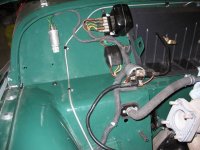
just to the outside of the electric control box on the sloped part of the fire wall. The bolt hole is about level with the top of the control box.
I saw a picture on an other thread (the thread was about refishing the engine bay of a red TR3) and one of the posts had a picture that included that area.
I saw a picture on an other thread (the thread was about refishing the engine bay of a red TR3) and one of the posts had a picture that included that area.
OP

jdubois
Jedi Warrior
Offline
TR3driver said:On post-60K cars, both the flasher and the control box were re-oriented.
I'll go double check the numbers when I get back to the car (it's at my folks house, not at my place at the moment), but since it doesn't look like the picture, I'm assuming it's a post-60K car. Anybody got a picture of that arrangement?

TR3driver
Great Pumpkin - R.I.P
Offline
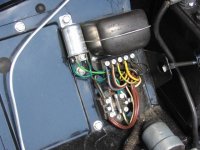
Not certain, but I think this is right for post-60K LHD. Obviously RHD has to have the flasher in a different location (along the top of the pedal box cutout as I recall).
Also note that there should possibly be a cover on the fuse block, which is not shown in this photo.
Also note that there should possibly be a cover on the fuse block, which is not shown in this photo.

Don Elliott
Obi Wan
Offline


Offline
Oops...mine was loose when I got it so my terminals face down. I guess I need to loosen and rotate it now. Thanks.

Don Elliott
Obi Wan
Offline
G
Guest
Guest
Guest
Offline
Oh how strict those judges can be....on the BCF.