• Hey Guest!
    British Car Forum has been supporting enthusiasts for over 25 years by providing a great place to share our love for British cars. You can support our efforts by upgrading your membership for less than the dues of most car clubs. There are some perks with a member upgrade!

    **Upgrade Now**
    (PS: Upgraded members don't see this banner, nor will you see the Google ads that appear on the site.)
Tips
Tips

cloud pic

Gundy

Luke Skywalker
Offline
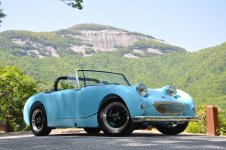
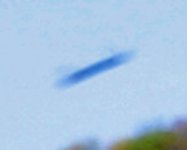
I took these two pics moments apart. Never noticed the
little cloud over Table Rock in one of the pics. It was the first pic I took. It isn't in any other pics.
Nikon D90 shot in fine resolution w/ a blue UVA filter.
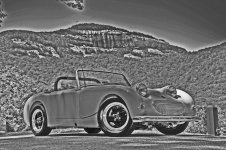
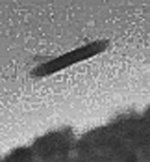
I enhanced the cloud pic in the third photo.
Neat cloud huh?
:jester:
first the cloud
 

Attachments

  • 28677.jpg
    28677.jpg
    117 KB · Views: 233
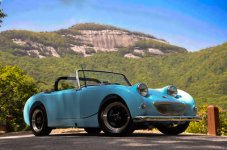
no cloud
 

Attachments

  • 28675.jpg
    28675.jpg
    121 KB · Views: 244
enhanced pic
:jester:
 

Attachments

  • 28676.jpg
    28676.jpg
    136.9 KB · Views: 237
Fooled around a little to come up with a color version for you.
 

Attachments

  • 28678.jpg
    28678.jpg
    114 KB · Views: 218
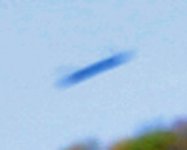
zoom up on the cloud
 

Attachments

  • 28681.jpg
    28681.jpg
    43.3 KB · Views: 208
Basil said:
A seed pod falling from the tree.

That sounds like as good a candidate as any.
:thumbsup:
Depth perception is tricky in a pic.
I thought it was far away but it could be close,
ie, seed pod with motion causing the bad focus
making it look far.
I first thought cloud but seed pod or such falling
looks to be more probable.
 
Now I see it...
 
Too bad you didn't use film. :devilgrin: :jester:
 
<span style="font-size: 11pt">I hate to tell ya, but that's not a cloud! It's a smoke signal! Indian retaliation, stating we didn't invent over the air communication! They did! </span>
Just thought you'd like to know.
 
DrEntropy said:
Too bad you didn't use film. :devilgrin: :jester:

You got THAT right! :jester:


I wouldn't have noticed except I was fooling around to get the enhanced image of the Sprite and when done this just pops out.
Regular shot looks like a little cloud.
Here is a blowup of the original image in that area of the pic.
Some have suggested it could be a bird. Don't think so.
Some have said it could have been a seed pod or such falling.
Maybe. Depth perception in pics ain't great.
It sure does look to be hanging parallel to the mountain top
over the mountain top.
Again....I never saw it that day. In the very first pic I took and not in the second shot seconds later while I was laying on the ground to get a nice perspective of the Sprite and get Table Rock in the pic too.
Darn those digital cameras.
:devilgrin:
Also a blowup of enhanced pic.
 

Attachments

  • 28729.jpg
    28729.jpg
    43.3 KB · Views: 137
  • 28730.jpg
    28730.jpg
    70.3 KB · Views: 142
Uhmmmm. That's not a cloud. You need to clean the sensor on your camera :wink:

Go set up a shot at F22 or so and shoot a pic of a completely blue sky...or a completely white monitor. Exposure time is irrelevant.

Open it in your favorite photo editing software and click "auto levels"

I think you will be surprised at what you see. It should be a smooth blank image....based on that image you posted it won't be.

I clean all my own sensors, but the process makes some folks nervous.

Sorry to disappoint the UFO crowd :smile:

Been doing this stuff for awhile now....my gear list is here: Cameras
 
I agree on the sensor cleaning. The D90 has a sensor self cleaning mode. Check your owner's manual to see how to use it. It won't get everything, but should get most of the larger stuff that will show up as your "cloud". You can also read this for further information on sensor cleaning. When I read your original post, I didn't realize that your "cloud" was the dust speck. I thought you were referring to the faint lenticular cloud-like formation in your enhanced photo, I just automatically spotted out your "cloud". Hope this helps. :thumbsup:
 
Why would it appear in just that shot but not in one
taken a second or two later?
It didn't appear in any subsequent shots either.
I'll follow the advice and check for sensor cleaning.
:thankyousign:
 
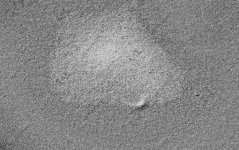
So...here's a shot of white photo paper.
It may look gray but it is white...I swear.
Nothing to see but crummy paper. Bump in da middle thing.
No specks present.
I worked the thing over and no specks. The camera does have
cleaning feature to select but I have refrained till I could check what is there now. Looks clean to me.
Also has an "Image Dust Off ref photo" select.
WTH...I just point and shoot.
I'll do a clear sky..when available ...(rainy)
and fool with that to search for specks.
All before I do ANY cleaning.

Here's an enhanced...best I could of the same photo.
Specks?
Beats me. The seed pod thing still looks best call so far.
Like I said...I point and shoot.
Sky pic when I can.
 

Attachments

  • 28737.jpg
    28737.jpg
    60.5 KB · Views: 103
Best I could do to enhance similarly.
:jester:
 

Attachments

  • 28738.jpg
    28738.jpg
    171.3 KB · Views: 46
What F-stop? ...did you run the levels on it?

The way I do it is to open Photoshop and fill the screen with a white background.
Ideally set the camera format ot RAW. If you are not used to that, use the largest JPeg format you have.
Set the camera at F22
ISO 100
Aperture priority
Shutter speed will be something like 1 second or more
Take the image.

Import the image to Photoshop
Open the levels commend and move the slider to the left as far as it will go.
The dirt spots will show
Clean sensor and put it back together and take another pic.

Rinse & repeat :smile:

Maybe it was a UFO!!!!
 
White paper auto fix. Took at 90 degrees from first pic.
 
Back
Top