• Hey Guest!
    British Car Forum has been supporting enthusiasts for over 25 years by providing a great place to share our love for British cars. You can support our efforts by upgrading your membership for less than the dues of most car clubs. There are some perks with a member upgrade!

    **Upgrade Now**
    (PS: Upgraded members don't see this banner, nor will you see the Google ads that appear on the site.)
Tips
Tips

What the......?

Gliderman8

Great Pumpkin
Gold
Country flag
Offline
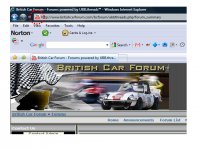
Tonight I noticed that the BCF logo (British flag) that is always on the header tab of IE has been replaced with the "YouTube" logo.
Whats going on? How do I get rid of it so it displays the BCF logo?
 

Attachments

  • 25398.jpg
    25398.jpg
    97 KB · Views: 130
I've still got the Union Jack.
 
Dunno, Elliot. Union Jack's flyin' proud here.
 
Mickey Richaud said:
Dunno, Elliot. Union Jack's flyin' proud here.
I'm quite certain that the problem is on my end... just don't know how to get rid of it and return it to normal :wall:
 
youse guys is lucky - I gets only the world. (durn Canadian customs)
 
When in doubt, reboot.
 
Elliot - you'll need to clear your icon cache. Every version of Windows and Internet Explorer has a different way to do it. Heaven forbid it should be easy.

Maybe Google "clear browser icon cache" to get some hints?

You can also delete the individual bookmark/favorite for BCF, close the browser, then clear the caches. Then restart browser and re-favorite BCF.

Tom
 
Mickey Richaud said:
When in doubt, reboot.
Right Mickey.... I will do that. The strange thing is that all other sites display the correct logos.... ie ebay, Comcast. Very strange.
 
NutmegCT said:
Elliot - you'll need to clear your icon cache. Every version of Windows and Internet Explorer has a different way to do it. Heaven forbid it should be easy.

Maybe Google "clear browser icon cache" to get some hints?

You can also delete the individual bookmark/favorite for BCF, close the browser, then clear the caches. Then restart browser and re-favorite BCF.

Tom
Will give that a try Tom.... by the way, still have not gotten to my laptop screen... to be continued!
 
You can also just delete the browser history and restart the browser.

T.
 
NutmegCT said:
You can also just delete the browser history and restart the browser.

T.
That is EXACTLY what I am doing now!
 
Success!
I cleared the cache and all is better now... I have the union jack back on the IE tabs..... THANK YOU everyone :thankyousign:
 
Back
Top