• Hey Guest!
    British Car Forum has been supporting enthusiasts for over 25 years by providing a great place to share our love for British cars. You can support our efforts by upgrading your membership for less than the dues of most car clubs. There are some perks with a member upgrade!

    **Upgrade Now**
    (PS: Upgraded members don't see this banner, nor will you see the Google ads that appear on the site.)

Old Slides

AngliaGT

Great Pumpkin
Silver
Offline
My Dad left me 100's of old slides before he died.
He came out here from Cedar Rapids ,Iowa,after WWII,& went to work for PG&E.
I have many old color slides fom the late '40's,the '50's,& the '60's.
I am trying to get people here who would appreciate them,& show them the slides.
I've come to the concusion that they need to be shared,& not put away
in boxes,where nobody knows that they ever existed.
I'm hoping to get together with a few local people who will help me put them
on CD's,etc.,& have a backup,should the originals be destroyed.
If there's anyone local who'd like to see them,then please let me know.

- Doug
 
Doug - you can get all those slides scanned into digital images and put on CDs at most office supply stores, like Staples. At least here in New England, it's pretty inexpensive.

Also, a local high school technology teacher could recommend a student to do it for you, for a small fee.

Sound like a great plan.

Edit: If you google "digitize slides" you'll find many services available. My neighbor used ScanCafe and was very happy with the results. And you can do it yourself with a $10 ebay scanner - and a LOT of patience.

Tom
 
Last edited:
A lot of those old slides ,I am sure , have yellowed.
Unfortunately, Mine did
 
Don,

Almost all of these are in excellent condition -
another reason to share them.

- Doug
 
Tom, Thanks, That's a great idea! Never thought of that, as we have many carousels from our old automatic slide projector, full of slides from 30/40 years ago. They might be ok as they have never been exposed to light over the years. Gotta do this! :thankyousign: PJ
 
I have been scanning old photos and slides off and on for the last few years. I use a Minolta Dimage Dual Scan III, but recently had to buy new software to keep this working with my Mac's Mavericks system software.

Last week I did some for a friend that his dad had taken at Trenton and Flemington Speedways in the late 1950's through 1962. I am now working on some of mine from 1972 through 1976 from Pocono Speedway. It is tedious, but I go in spurts, and then do not do any for a month or two.

I share a lot of them on my Facebook Timeline, and also at my page on Flickr. I hope to be posting some more there when I am done with this batch. But I do currently have some old family photos there as well as current photos of trips, toys, etc.

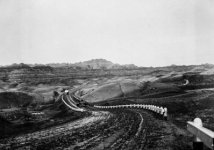
Here is an old family shot of the Bad Lands taken by my Grandfather in the 1930's.

BadLandsLR5-Snap.jpg
 
I did many hundreds of them from my dad's collection. I found that I had to spend a fair bit of time with the ones that were pre-1955 so-as to correct the color (which tends to go to reds). It was fun to bring a photo back... with green lawn and normal skin tones. It's not difficult but it takes time, and I used PaintShopPro (and old thing that I prefer).

I scanned them myself (1200dpi sort of levels), but that is TEDIOUS. As others posted, nowadays there are many fairly inexpensive services that will do it for you (like Costco around here).
 
Will they fix color?

I doubt anyone will do this, Don. It requires custom effort (I think). Too many variations I suspect... and one often has to look at the corrected image to decide if it's done. Sometimes I over-corrected and ended up with an almost crazy green lawn, but it was MUCH better than the near shades of red for everything.
 
Correcting color is probably one of the BIG advantages of do-it-yourself. The commercial services are automated, and only you know how much correction to try on a given slide.

But again, it sure takes a lot of time to do a collection.
 
For me, the biggest problem is the dust spots. Does anyone have a good solution to cleaning old slides or negatives before scanning? I use an Ilford Antistaticum cloth and a Staticwisk Anti-Static Brush with sometimes mixed result leading to tedious cleaning of dust spots.
 
Yes, that was a problem for me too. Just tried to blow/brush them off. Then, using PaintShopPro again (or any good graphics editor), I removed most of them (essentially, by copying the area immediately around the spot - and I defy anyone to tell something has been done). Like color correction, takes time. In scanning really old print photos, I removed most of the major imperfections too.
 
storage tip: When burning scanned film images to CD or DVD, use archival grade discs.

A lot of common discs (especially cheap ones) can have life expectancy that's less than the films you're trying to back up. (Sometimes a lot less.)
 
Good point. One wonders about the long-term status of ANY of these media... including the file format itself. Perhaps in 30 years one will wonder "what is this JPG file thing?" Should we also be saving in multiple file formats (like TIFF)??? This is certainly a problem with text documents.
 
One downside to having a service scan the images, they won't add tags to your files. Slides usually have the date stamped onto the frame. You have to find the slide and match it up to the file to enter the ID tags. That was the main reason I scanned my own. While I was scanning the next batch, I was tagging a touching up.
 
Yes, that was a problem for me too. Just tried to blow/brush them off. Then, using PaintShopPro again (or any good graphics editor), I removed most of them (essentially, by copying the area immediately around the spot - and I defy anyone to tell something has been done). Like color correction, takes time. In scanning really old print photos, I removed most of the major imperfections too.


You can buy cans of compressed air at any office store - just don't hold them too close.
 
You can buy cans of compressed air at any office store - just don't hold them too close.

I'm spooked by those only because sometimes there is liquid in that propellant (or condensate). I prefer a photographer's puffing thing (with brush on the end). :)
 
I use a "staticmaster" camel hair brush.
 
How do you get the static out of a camel?
Rub it with a dryer sheet?
 
How do you get the static out of a camel?
Rub it with a dryer sheet?

Very carefully... sneaking up from behind.
 
Back
Top