• Hey Guest!
    British Car Forum has been supporting enthusiasts for over 25 years by providing a great place to share our love for British cars. You can support our efforts by upgrading your membership for less than the dues of most car clubs. There are some perks with a member upgrade!

    **Upgrade Now**
    (PS: Upgraded members don't see this banner, nor will you see the Google ads that appear on the site.)
Tips
Tips

iPhone photos

NutmegCT

Great Pumpkin
Bronze
Offline
Mornin' all.

A friend (iPhone user) sent me photos from his recent trip to the UK.

They're all HEIC format, sent via RCS. In checking Properties, most are under 100k in size; a few are around 5meg in size.

Two questions:

1. Any idea why most would be small file sizes, but a few are so much larger? They're all outdoor shots of 18th century buildings and statues.

2. Is there any way to tell date/time of each photo?

I downloaded each to my Android photo gallery, and to my laptop photo gallery. The file size issue doesn't change, and neither platform (Android or Windows) shows any file data (date, time, GPS, etc.) - other than pixels, height, width.

Thanks.
Tom M.
 
Last edited:
One thing I have noticed with my Samsung is the frame size (1:1, 3:4, 16:9) makes a difference in file size. Because these phone cameras have different sized lens matched with different sized sensors, when you change from one lens to another it will change the size of the photo.
 
Thanks Walt. This guy just "points and clicks". Does the IPhone change frame and/or lens size on its own? On my cell, you have to manually change those things.
TM
 
Hi I can’t help with what happens once the pic is on android
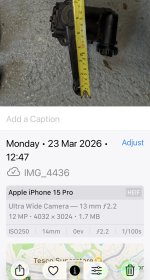
But the iPhone will give you all the picture properties and if location is enabled where it is see attached.

If the picture is emailed from the phone the sender has the prompt to reduce file size ( I guess to ease sending and reduce data usage)
 

Attachments

  • IMG_4451.jpeg
    IMG_4451.jpeg
    395.5 KB · Views: 11
Does the IPhone change frame and/or lens size on its own?
Doing a search using your sentence above...the answer: "Yes, the iPhone camera app automatically switches between lenses."
It can be disabled in settings.
Looking at my own iphone photos, the size of photos are different particularly when I've zoomed in on the subject.
 
Thanks Walt. This guy just "points and clicks". Does the IPhone change frame and/or lens size on its own? On my cell, you have to manually change those things.
TM
Tom, assuming the frame size doesn't change, two things that can change the file size of an image is 1) the complexity of the image (a picture of a small aircraft in the sky, for example, will not have a lot of complexity and thus a smaller file size.
Also, when I pinch to zoom my iPhone 17 Pro Max and zoom beyond the normal optical zoom capability, (I think 8x), the camera switches to digital zoom which captures data from only a small central portion of the sensor (a crop) which will usually resulting less data.

For example, the first image of a piece of art on my wall. It has a l to of colors and changes in contrast, etc. This image file is 3.8MB, but the second image, which is just a shot of a play beige wall, is only 2.3 MB. Finally, the third image, in which I zoomed in quite a bit on the wall, (past the optical zoom) is only 325 KB. (Not, I'm talking about the original HEIC file sizes - I had to convert to JPG to upload to the post)

Original HEIC file Size: 3.8 MB
IMG_6838 Large.jpeg


Original HEIC file size 2.3 MB
IMG_6837 Large.jpeg


Original HEIC file size 325 KB
IMG_6839 Large.jpeg
 
My iPhone doesn't take good pictures; they are usually a tad fuzzy. Now my wife's iPad takes crystal clear photos like a professional took them! Phone and iPad are both Apple. Wonder why?
 
Thanks gentlemen. Hamish - the photos I received show exactly what yours do. Camera info, but nothing about date/time. Somehow I thought that most cell phones today recorded the date/time in every photo! Actually surprises me that the iPhone images Hamish posted don't show date/time.

TM
 
Thanks Yakko. But I'd think if Hamish is using an iPhone, the date/time and maybe GPS info, would show when you use the iPhone to see the photo. (or am I missing something)
 
The only thing I can see is 5G 98 on the screen? :rolleyes2:
 
iPhone photos have a “live” option. The live feature results in a burst of images, when taking one photo. (Presumably to get the moment when nobody is blinking?) Default is “on”.

I turn off the “live”, but somehow it turns itself back on occasionally.

This may be the reason some files are larger than others??
 
Thanks Mike. My main target here, is, with all the info stored in the photo's file, why does the date/time/GPS coordinate not show up? Even in Hamish's iPhone photos, there's no date/time, etc. shown.
 
Back
Top