

-
 Hey Guest!
British Car Forum has been supporting enthusiasts for over 25 years by providing a great place to share our love for British cars. You can support our efforts by upgrading your membership for less than the dues of most car clubs. There are some perks with a member upgrade!**Upgrade Now**
(PS: Upgraded members don't see this banner, nor will you see the Google ads that appear on the site.)
You are using an out of date browser. It may not display this or other websites correctly.
You should upgrade or use an alternative browser.
You should upgrade or use an alternative browser.
How do I add Linux?
- Thread starter PAUL161
- Start date


Offline
Paul - go here for the Fedora version of Linux:
https://fedoraproject.org/
Read the basics, then choose the appropriate ISO download to a bootable CD or DVD. You can try out Fedora Linux without disturbing your Windows installation. If you like it, you can then install it to the HD in that second partition.
Doc's the Linux expert, who's talked me through several Linux issues. He may recommend another version of Linux for you instead.
Tom
running Fedora 17
https://fedoraproject.org/
Read the basics, then choose the appropriate ISO download to a bootable CD or DVD. You can try out Fedora Linux without disturbing your Windows installation. If you like it, you can then install it to the HD in that second partition.
Doc's the Linux expert, who's talked me through several Linux issues. He may recommend another version of Linux for you instead.
Tom
running Fedora 17

GregW
Yoda
Online
Interesting Tom that Doc was my influence for Linux too and we both chose Fedora.
Hi Paul,
There are four desktops to choose from in Fedora, they are called "spins". I've tried them all and settled on KDE.I haven't checked with the newest release, but the default spin to download for ver 17 was the Gnome desktop which I hated. I would suggest downloading a couple options and play with them for a while before commiting them to your hard drive. You can run the OS straight from a cd or a thumb drive.
Hi Paul,
There are four desktops to choose from in Fedora, they are called "spins". I've tried them all and settled on KDE.I haven't checked with the newest release, but the default spin to download for ver 17 was the Gnome desktop which I hated. I would suggest downloading a couple options and play with them for a while before commiting them to your hard drive. You can run the OS straight from a cd or a thumb drive.


Offline
Mehheh... my eeevile plan is working...
Not sure if Microstuff Incarnation Eight will want to share living space well with Linux, ain't tried it. But the Live CD spins are a good start. Fedora is a good way to go for desktop/laptop trial. I'm Gnome partial, started with it back-when, 'cause KDE was klunky by comparison. Now it's a personal choice. With a separate partition you can install Fedora and create a dual-boot machine. But do a bit of LiveCD playing and decide which one to put on your K: first. And do a lot of reading.
For a bare-metal install I go with CentOS every time. Even for a desktop machine. I find it more "compliant" to my needs than the more "user-friendly" Fedora.
...or just go out and get a ChromeBook! :grin::banana:
Not sure if Microstuff Incarnation Eight will want to share living space well with Linux, ain't tried it. But the Live CD spins are a good start. Fedora is a good way to go for desktop/laptop trial. I'm Gnome partial, started with it back-when, 'cause KDE was klunky by comparison. Now it's a personal choice. With a separate partition you can install Fedora and create a dual-boot machine. But do a bit of LiveCD playing and decide which one to put on your K: first. And do a lot of reading.
For a bare-metal install I go with CentOS every time. Even for a desktop machine. I find it more "compliant" to my needs than the more "user-friendly" Fedora.
...or just go out and get a ChromeBook! :grin::banana:
GregW
Yoda
Online
There are four desktops to choose from in Fedora, they are called "spins".
There is another desktop that is available to Fedora users, but it looks like you can only install it once you have one of the spins installed on your hard drive. It is called Mate. It is a branch of the Gnome version 2 desktop, which I did like when I first started down the Linux road.
The biggest difference to me with Linux is how you install programs. There is a repository of apps that you can access from your system settings. However not all the programs you may want are available there. Sometimes you have to hunt around the internet to find them and then see if they have an installer that works with your particular flavor of Linux. For general needs (office programs, email, browsers, music players) the repository is all you'll need.
OP

Offline
I downloaded Fedora 18 desktop and now what do I do with it? There's no install/setup folder. I have the old version of Fedora 6 on 4 discs that's in another computer, but my lap top with W-8 won't even recognize it for some reason. Do I have to burn it to a disc? Confused. PJ
GregW
Yoda
Online
Yes. What you downloaded is an ISO file, so you'd burn it as an image. It looks like 18 is too big for a CD, so you'll need to burn it onto a blank DVD. Depending on how your computer is set up, you may need to go into the BIOS and change the boot order to have the DVD drive boot before the hard drive once you have the disc burned.
You can read here also. https://docs.fedoraproject.org/en-US/Fedora/17/html/Installation_Guide/sn-making-media.html
You can read here also. https://docs.fedoraproject.org/en-US/Fedora/17/html/Installation_Guide/sn-making-media.html
Last edited:
Offline
There will be no "install" file. You downloaded WHAT Fedora Desktop file? An *.iso" file?
I suggest you do some searching with regard to the "How-to" Linux info before you go further.
Stuff like this: https://www.wikihow.com/Install-Fedora
I suggest you do some searching with regard to the "How-to" Linux info before you go further.
Stuff like this: https://www.wikihow.com/Install-Fedora
OP
Offline
Thanks Doc! And thanks for the link! I'll put everything on a stick and change the boot order. I really want the new version in this computer, but I want it installed to the separate partition so there's no interference with the other OP system. Does the install program give you this option? PJ
GregW
Yoda
Online
no idea how Win8 will see it ( and react).
Me neither, but GRUB should grab hold of the computer before Win8 loads?
Paul, while using the livecd (or DVD as the case may be) Fedora wont put anything permanent on your hard drive. So you don't need to worry about partitions ATM.
What the liveCD does is give you a preview of what the desktop will look like. You can interact with it but you wont be able to install apps until you commit the OS to an install. There will be an icon on the desktop to install.
Once you do install, there is a wizard of sorts that guides you through the process and asks how you want to install, how to partition the drives, with what file format (I.E.: NTFS, Ext4, fat32) and whether you want a swap file.
Doc, is the swap file even needed?
GregW
Yoda
Online
Once you do install, there is a wizard of sorts that guides you through the process
That comment might make you a little nervous. Actually, the install wizard is a fine piece of software. Way better than the WinXP installer and probably better than the one for Win7.
GregW
Yoda
Online
Just for fun, here is a shot of my KDE desktop.
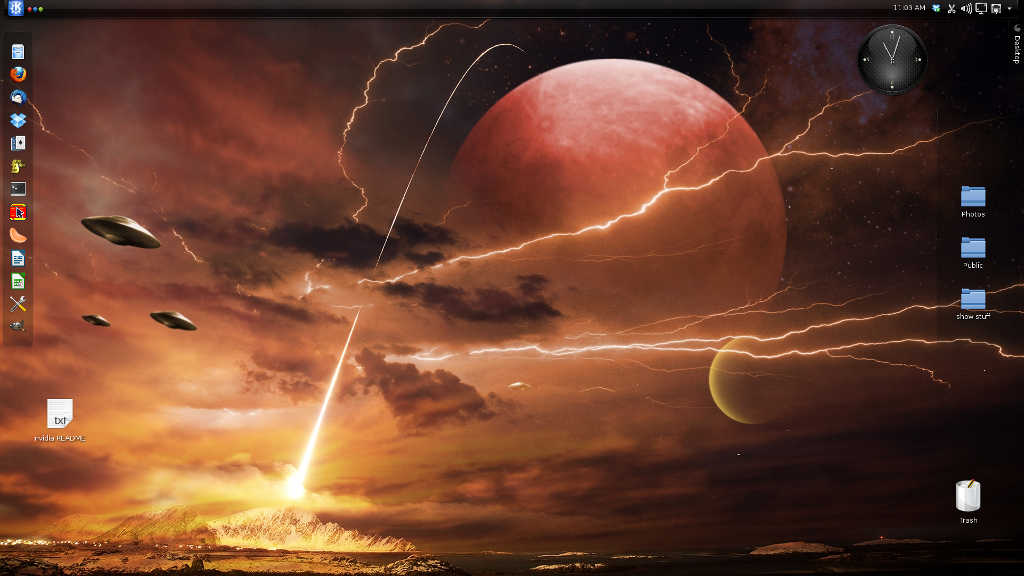
The blue "K" in the upper left works the same as the Start button in Windows. The left bar of icons is similar to the launch pad in the Mac OS. Widgets like the clock can be added anywhere on the desktop and can be resized to taste. Same with the icon on the launchpad.
The blue "K" in the upper left works the same as the Start button in Windows. The left bar of icons is similar to the launch pad in the Mac OS. Widgets like the clock can be added anywhere on the desktop and can be resized to taste. Same with the icon on the launchpad.

GregW
Yoda
Online
Doc,
I read about half of this article, you may find it interesting about loading a non Win8 OS on an UEFI booting system.
https://www.zdnet.com/my-experiment...with-uefi-boot-manager-7000013627/?s_cid=e589
I read about half of this article, you may find it interesting about loading a non Win8 OS on an UEFI booting system.
https://www.zdnet.com/my-experiment...with-uefi-boot-manager-7000013627/?s_cid=e589