• Hey Guest!
    British Car Forum has been supporting enthusiasts for over 25 years by providing a great place to share our love for British cars. You can support our efforts by upgrading your membership for less than the dues of most car clubs. There are some perks with a member upgrade!

    **Upgrade Now**
    (PS: Upgraded members don't see this banner, nor will you see the Google ads that appear on the site.)
Tips
Tips

Fun with Cables

DNK

Great Pumpkin
Country flag
Offline
Still finishing up connecting the Smart TV to the rest of the components.
This is a thru the wall job and hopefully done soon.
The latest adventure is hooking a video cable from the TV to the AV receiver so I can do all the adjustments and settings.
It needs the TV as it is all done by on screen prompts.
My question...I went to Radio shack to get a longer vid cable as my longest was 6 feet and I needed 12 and all they had was a audio cable.
They said it "should" work.
So you audiophiles out there.So that I don't have to remove the TV to get to the chase more than once.
Will the audio cable work for video
 
Don - what kind of audio/video cable are they talking about?

If it's the standard red/white two wire cable, it'll work, but I doubt it will have the bandwidth a digital system needs. Maybe a "super duper gold shielded" cable might work ...

Here's the generic audio cable used in the 70s through 90s:

cables-to-use-2.jpg


But if it's a state of the art system, I don't think it should use standard audio cables. Wouldn't it need HDMI or USB or glass fiber something similar?

Tom
 
Might work, but I'd bet, as pointed out, that it won't have the signal carrying capacity to get a good clear picture for video. I'd get a decent HDMI or fibre cable, not only to handle today's signals but so you're not pulling it all apart next year or the year after as new data options become available. Not really explaining that well, just assume that over time the data coming in will increase and it's better to have too much capacity than not enough and not be satisified with resulting audio/video.
 
All it is is a monitor cable to show "video" or actually pictures from the AV to the TV.
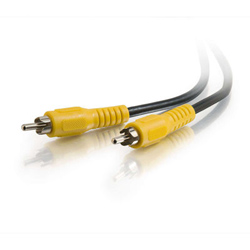
It is a single yellow vid cable ,usually

123321.jpg
 
Don - the yellow, red, and white cables are all the same. Suitable for the 1980s, but not up to today's data, as Mike says.

Tom
 
What I got where black, not sure that it matters, and believe me this only to set up the AV.
It is a 7.1 with a zone 2 (more questions on that possibly later) and the cable is so I can see on the tv the connection # for each device and the speaker volumn for each zone and all the other things I need to adjust. They show up on the TV and I can move connections up and down and volumn up and down.
This is an old Denon 7.1, does not even have HDMI.
Actually I tend to use it most for the Pandora thru the TV
 
I don't know how detailed "setting up the AV" is - delicate stuff like configuring levels and sensitivity? or just verifying the signal is going from one unit to the other at initial set up?

If the former, sounds like using audio cable isn't that critical. Go for it.
Tom
 
I don't know how detailed "setting up the AV" is - delicate stuff like configuring levels and sensitivity? or just verifying the signal is going from one unit to the other at initial set up?

If the former, sounds like using audio cable isn't that critical. Go for it.
Tom
When you need to configure where the DVD plays thru and what jacks it is using and the same for all the peripherals.
You have to assign them the as the AV doesn't automatically do it.
Also my Zone 2 feeds 4 rooms in my house and I am trying to feed it of the analog jacks off the TV as Zone 2 doesn't read digital
This is all info that the monitor shows

Do appreciate the help though Tom, keep it coming
 
Well... as Rosanna Rosanna Danna Says
RosannaDanna.jpg


"Never Mind"

Found 2 pages later...S Video will work.
That I have plenty of the required length
 
Back
Top