Hey Guest!

 Hey - did you know if you click on the title of a thread it will take you to the first unread post since you last visited that thread?
 but were afraid to ask:
  STOP!! Never post your email address in open forums. Bots can "harvest" your email! If you must share your email use a Private Message or use the
  smilie in place of the real @
 Pretty Please - add it to our Events forum(s) and add to the calendar! >>


Offline
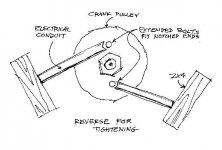
Here's a drawing of a cranknut unlocker/locker brace I built from a couple of bolts, pieces of electrical conduit (EMT) and pieces of 2x4s. It braces the crank enough to lever the nut undone with a big long cheater handle.
This is my first image upload and hopefully it'll go alright. Please bear with me if I create any problems. TIA,

This is my first image upload and hopefully it'll go alright. Please bear with me if I create any problems. TIA,