• Hey Guest!
    British Car Forum has been supporting enthusiasts for over 25 years by providing a great place to share our love for British cars. You can support our efforts by upgrading your membership for less than the dues of most car clubs. There are some perks with a member upgrade!

    **Upgrade Now**
    (PS: Upgraded members don't see this banner, nor will you see the Google ads that appear on the site.)
Tips
Tips

CUPS printer help?

NutmegCT

Great Pumpkin
Bronze
Offline
Any experts here with advice on adding a remote printer on a Linux system?

Linux laptop to remote printer on a WinXP machine.

Just guessing ... but I'd bet there's at least one ....

Details cheerfully provided if someone takes the bait - oops, make that <span style="font-style: italic"><span style="font-weight: bold">if someone kindly volunteers</span></span>.

Tom
 
heh... does the WinXP machine have a fixed IP addy?

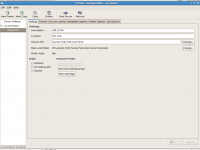
If so, try adding printer option: <span style="font-style: italic">app socket</span> , then the URI string: <span style="font-style: italic">socket://<span style="font-weight: bold"><IP address></span>:9100</span>
 

Attachments

  • 25801.png
    25801.png
    62.2 KB · Views: 140
Thanks Doc. Just did the socket thing, and didn't get the cups error. Clicked OK and got Printing Test Page.

But ... after five minutes, the printer status in the printing setup box still says "processing". Nothing out of the printer yet.

And because it still says Processing, the OK button to "set" the printer setup is greyed out.

Like my brain.

T.
 
You ~DO~ have the printer shared on the WinXP box, yes?
 
Here are the gory details:

Fedora 15/Gnome3, latest updates as of 4pm EST 7/14/11.

Trying to connect to a Canon inkjet printer, which is physically on a WindowsXP box via usb cable. Printer is made shared on the Windows machine. I've printed to it from previous Linux laptops using SAMBA/CUPS.

On the F15 machine, I can connect to all shared folders on the WinXP box via SMB.

But trying to set up the printer connection from WinXP box to F15 is not working.

I use Printing Setup, then Network Printer, then enter the WinXP IP, then choose Find Network Printer. Note there's no CUPS or SMB printer choice - only AppSocket/JetDirect, IP, HTTPS/ and LPD. After a few minutes, I'm prompted to enter username and p/w for the WinXP machine, and the printer is located. Connection is verified. Connection is shown as Windows via SAMBA. I click OK and move to driver installation.

I install the Canon driver, and click Apply. Immediately I get this window:

* * * * *
cups server error

There was an error during the CUPS operation. "client-error-not-possible'

OK
* * * * *

Only choice is to click OK, which returns to the driver install window, where I can only hit Cancel.

This puzzles me, as I obviously connected to the printer using the Printing setup app. And I can reach, open, and modify all files and folders in the Shared folder on the WinXP box.

8am EST update: I tried the appsocket suggestion, and get the results in my previous post.

Thanks Doc!
T.

 
Is your <span style="font-style: italic">/etc/samba/smb.conf</span> file workgroup name (in the [global] section) the same as the Winblows workgroup?
 
hmmm - interesting ... there is NO /etc/samba/smb.conf file.

There's no smb.conf file anywhere in Filesystem.

The plot thickens.

T.
 
"YUM install SAMBA"!!!! :shocked:
 
SAMBA already installed. That's how I can reach all the files on the WinXP machine. Shows as SMB:192.168.1.104 in FileManager.

right?

T.
 
I s'pose so. But ya GOTTA have that smb.conf file ~someplace~ in there!

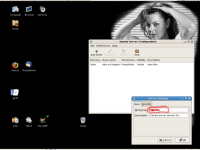
In the GUI: System> Administration> Server Settings> Samba... Preferences> Server Settings. That ~may~ get you access to it from the GUI:
 

Attachments

  • 25803.png
    25803.png
    97 KB · Views: 100
OK - finally back at the laptop.

Looks like the SMB remote connection doesn't mean that SAMBA was there after all. So I did yum install samba.

Reboot ... install printer ... and got exactly the same result! cups error after everything ran smoothly (like before the samba installation).

And there's still no SAMBA printer choice available in printer setup.

Maybe we should take this into PM?

T.
 
smb.conf should only be needed if your Linux box is setup as a Windows File Sharing server. I.e. files on the linux box are accessible to your windows computer.

For linux to work as a SMB ~client~ it doesn't have to have a smb.conf file on the system.

Also, you don't have to have Samba "fully installed" to be able to reach other computers on your network. You only really need "samba-client" installed.

Though, I'll have to admit, I don't do printing (rather, haven't found a need to in recent years) so the CUPS stuff is a bit out of my comfort zone...
 
Thanks Rob. That explains why I could browse all the shared folders on the WinXP box upstairs, without installing full SAMBA.

I'm not trying to read files on the Linux box when using the WinxP box. Just the other way around.

Really confounding to me that the Printer Setup can find the networked printer, identify it, and then assign a valid SMB address, then even verify the connection and show "printer is shared and reachable" ... but then I get the blasted cups error when sending the test page.

argh.

T.
 
Back
Top