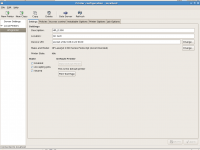
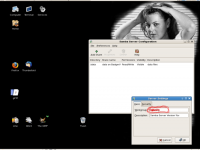
Here are the gory details:
Fedora 15/Gnome3, latest updates as of 4pm EST 7/14/11.
Trying to connect to a Canon inkjet printer, which is physically on a WindowsXP box via usb cable. Printer is made shared on the Windows machine. I've printed to it from previous Linux laptops using SAMBA/CUPS.
On the F15 machine, I can connect to all shared folders on the WinXP box via SMB.
But trying to set up the printer connection from WinXP box to F15 is not working.
I use Printing Setup, then Network Printer, then enter the WinXP IP, then choose Find Network Printer. Note there's no CUPS or SMB printer choice - only AppSocket/JetDirect, IP, HTTPS/ and LPD. After a few minutes, I'm prompted to enter username and p/w for the WinXP machine, and the printer is located. Connection is verified. Connection is shown as Windows via SAMBA. I click OK and move to driver installation.
I install the Canon driver, and click Apply. Immediately I get this window:
* * * * *
cups server error
There was an error during the CUPS operation. "client-error-not-possible'
OK
* * * * *
Only choice is to click OK, which returns to the driver install window, where I can only hit Cancel.
This puzzles me, as I obviously connected to the printer using the Printing setup app. And I can reach, open, and modify all files and folders in the Shared folder on the WinXP box.
8am EST update: I tried the appsocket suggestion, and get the results in my previous post.
Thanks Doc!
T.


 Hey Guest!

 Hey - did you know if you click on the title of a thread it will take you to the first unread post since you last visited that thread?
 but were afraid to ask:
  STOP!! Never post your email address in open forums. Bots can "harvest" your email! If you must share your email use a Private Message or use the
  smilie in place of the real @
 Pretty Please - add it to our Events forum(s) and add to the calendar! >>