
• Hey Guest!
    British Car Forum has been supporting enthusiasts for over 25 years by providing a great place to share our love for British cars. You can support our efforts by upgrading your membership for less than the dues of most car clubs. There are some perks with a member upgrade!

    **Upgrade Now**
    (PS: Upgraded members don't see this banner, nor will you see the Google ads that appear on the site.)
Tips
Tips

Computer thoughts needed

JPSmit

Moderator
Staff member
Country flag
Offline
was doing a workshop with a video clip yesterday and could not get the sound to come out of the speakers. We tried another set and ultimately used another computer.

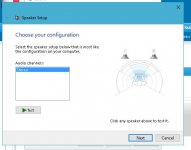
Last night was experimenting and discovered that if I go to the SOUND control panel and the configure screen (attached) and press the speaker buttons I get sound through the headphones (so not the plug) but if I load (for instance) an internet radio station it will only play through the computer speakers.

I have windows 10.

Any ideas that don't involve sledge hammers Linux or Mac?

thanks
speaker.JPG
 
Never mind - found it - rookie mistake :rolleyes:
 
I spoke too soon.

Rookie Mistake was thinking (in the attached pic) the "speakers" referred to external speakers - it is the internal.

So.

If I set speakers as the default, music only plays through the computer's speaker - and if I plug in headphones, nothing changes.

If I set headphones as the default, it only plays through the headphones - and if I unplug the headphones it does not revert to the computer's speaker.

what am I missing?

thanks - arrgghh
 
Not sure I'm following you, but ... I'm assuming you're trying to get sound to come from *external* speakers that are plugged in to the external speaker jack?

Right click the "speaker" icon on the lower right of the screen. Choose Playback Devices. Choose the tab Playback.

Click the playback option you want, and hit Set Default.

Hope this helps.
Tom M.
 
Not sure I'm following you, but ... I'm assuming you're trying to get sound to come from *external* speakers that are plugged in to the external speaker jack?

Right click the "speaker" icon on the lower right of the screen. Choose Playback Devices. Choose the tab Playback.

Click the playback option you want, and hit Set Default.

Hope this helps.
Tom M.

That part I get, but in the entire history of my ownership of this and every laptop I have ever owned, when you plugged in speakers (or headphones) the internal speaker ceased to be used and when I unplugged speakers (or headphones) the internal speaker began to be used again. Now all of a sudden (Since last month) I have to specify - what's up with that?
 
Back
Top