• Hey Guest!
    British Car Forum has been supporting enthusiasts for over 25 years by providing a great place to share our love for British cars. You can support our efforts by upgrading your membership for less than the dues of most car clubs. There are some perks with a member upgrade!

    **Upgrade Now**
    (PS: Upgraded members don't see this banner, nor will you see the Google ads that appear on the site.)
Tips
Tips

Internet advice needed - small words please

JPSmit

Moderator
Staff member
Country flag
Offline
We have cable internet - package called Ignite 60 (60 mbps)

If I plug the computer into the modem, I get blistering speed - 60 Mbps or more, If I go with wireless in the same room (8 feet away), I get 8-10 mbps.

I called Rogers (my provider) and they tell me that this is normal and that if I restart the modem I might get a bit faster. I hate being treated like an idiot.

Is there anyway to get faster internet or am I doomed?

BTW, the modem is up to date (they call it the rocket modem - more of a bi-plane modem if you ask me)

any thoughts?
 
Is the WiFi in the modem? Or is the WiFi a separate box. Also what is the WiFi capability of the device you're trying to get on the Internet (laptop?)
 
Hi J-P. 1. How are you measuring the speed of the hard-wire connection (direct to modem)? and the wireless connection (wireless through the router)?

Many wireless routers have a much lower maximum connection "speed" than a hardwire connection. Same limitation on internal wireless cards in the computer/device.

You *may* need a faster wireless router ("wi-fi").

(I could only dream of getting a true 60mbps internet connection!)

Tom
 
Is the WiFi in the modem? Or is the WiFi a separate box. Also what is the WiFi capability of the device you're trying to get on the Internet (laptop?)

yes, wifi is in modem - not sure about the capability of my laptop but, it is the same for mine (lenovo - Windoze 7) plus wife's macbook air, daughter macbook and various ipads.
 
Hi J-P. 1. How are you measuring the speed of the hard-wire connection (direct to modem)? and the wireless connection (wireless through the router)?

Many wireless routers have a much lower maximum connection "speed" than a hardwire connection. Same limitation on internal wireless cards in the computer/device.

You *may* need a faster wireless router ("wi-fi").

(I could only dream of getting a true 60mbps internet connection!)

Tom

Measuring with Speedtest: https://www.speedtest.net/

Interestingly just measured and got 17.97 - perhaps because it is Sunday and the rest of the world isn't using much interweb.
 
Not sure if this is even related but I had a smokin fast WIFI until folks moved in next door.
started moving at snail pace. And the range was bad.
did some digging and changed the WIFI channel to I think 6?
and now it flies!
and yes it was secured before the change son told me it has something to do with having to sort out different streams of data on the same channel. If have a empty one you can improve speed and distance.
 
Your computer has two network adapters, one wired and the other wireless. They have separate hardware and capabilities. The wired is almost always faster. There are different protocols for wireless and your speed will depend on what the hardware was designed for. 802.11b is an old and cheap spec that is also the slowest these days. HERE is a chart of the different protocols and their specs. I'm guessing your computer's WiFi is slower than the modem, so the modem will downgrade it's speed to your computer.
 
Your computer has two network adapters, one wired and the other wireless. They have separate hardware and capabilities. The wired is almost always faster. There are different protocols for wireless and your speed will depend on what the hardware was designed for. 802.11b is an old and cheap spec that is also the slowest these days. HERE is a chart of the different protocols and their specs. I'm guessing your computer's WiFi is slower than the modem, so the modem will downgrade it's speed to your computer.

almost guaranteed :( How can I find out?
 
Hmmm, I'd have to turn my Windows computer on to be sure... However, try this. Right click on "My Computer" and choose "Properties". In the window that opens, look for the Device Manager and open that. There will be a list of what is on your computer, expand the network cards. Double clicking a network device will bring up its properties. Snoop around in there looking for what letter follows the 802.11.
 
Suggestion:

1) Turn OFF the provider's WiFi "feature" in the management GUI.
2) Get a WiFi router from Netgear or Linksys (I like "Buffalo" for businesses).
3) In the management warez of the added router, give it a name you will remember (Naming a router something like: "Terpsichore" would be a hard one to guess). Assign it an alhpa-numeric KEY.
4) Tell it to use channel 11 and turn OFF the SSID broadcast (not the WiFi broadcast).
4) Plug it into the provider's gizmo with a CAT-5 cable.
5) Turn on your lappy and "search" for WiFi signals. One should be there called "unknown." Tell the laptop to try connecting and check the box asking if you want to connect to "hidden" network.
6) Type in the "secret" SSID and WEP/WPA key.
7) Check your speed...

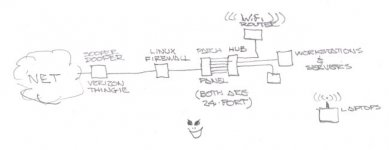
The scheme I use for both clients and hovel:

attachment.php
 

Attachments

  • LAN_scan.jpg
    LAN_scan.jpg
    14.7 KB · Views: 87
Just noticed switching hub and panel are in reverse order... and the firewall should be plugged into the HUB, not the panel. duh. :eek:
 
Hmmm, I'd have to turn my Windows computer on to be sure... However, try this. Right click on "My Computer" and choose "Properties". In the window that opens, look for the Device Manager and open that. There will be a list of what is on your computer, expand the network cards. Double clicking a network device will bring up its properties. Snoop around in there looking for what letter follows the 802.11.

Looks to me like 802.11n - which is odd because I can't see the 5 GHz network, just the 2.4
 
Suggestion:

1) Turn OFF the provider's WiFi "feature" in the management GUI.
2) Get a WiFi router from Netgear or Linksys (I like "Buffalo" for businesses).
3) In the management warez of the added router, give it a name you will remember (Naming a router something like: "Terpsichore" would be a hard one to guess). Assign it an alhpa-numeric KEY.
4) Tell it to use channel 11 and turn OFF the SSID broadcast (not the WiFi broadcast).
4) Plug it into the provider's gizmo with a CAT-5 cable.
5) Turn on your lappy and "search" for WiFi signals. One should be there called "unknown." Tell the laptop to try connecting and check the box asking if you want to connect to "hidden" network.
6) Type in the "secret" SSID and WEP/WPA key.
7) Check your speed...

The scheme I use for both clients and hovel:

attachment.php

thanks Doc! I recognize that evil grin BTW :smile:

Feeling much as I do when I try to make sense of the wiring of the Midget, I will try similarly to make sense of this. cheers!

BTW - when I look at wifi routers, I see various letters "N" & ??? do I need to care about any of that?
 
Not sure if this is even related but I had a smokin fast WIFI until folks moved in next door.
started moving at snail pace. And the range was bad.
did some digging and changed the WIFI channel to I think 6?
and now it flies!
and yes it was secured before the change son told me it has something to do with having to sort out different streams of data on the same channel. If have a empty one you can improve speed and distance.
I'll bet this is the problem, or on the right path anyway. I suspect interference. If you have someone else near you that also has a WiFi router, you can't both be on the same channel. The two routers will interfere with each other. Also, other things that can interfere are cordless phones (landline, not cellular) and anything that runs on the 2.4GHz band.
 
I'll bet this is the problem, or on the right path anyway. I suspect interference. If you have someone else near you that also has a WiFi router, you can't both be on the same channel. The two routers will interfere with each other. Also, other things that can interfere are cordless phones (landline, not cellular) and anything that runs on the 2.4GHz band.

OK we got cordless phones too - is this a matter of changing channels as a first step?
 
Back
Top