

-
 Hey Guest!
British Car Forum has been supporting enthusiasts for over 25 years by providing a great place to share our love for British cars. You can support our efforts by upgrading your membership for less than the dues of most car clubs. There are some perks with a member upgrade!**Upgrade Now**
(PS: Upgraded members don't see this banner, nor will you see the Google ads that appear on the site.)
You are using an out of date browser. It may not display this or other websites correctly.
You should upgrade or use an alternative browser.
You should upgrade or use an alternative browser.
TR2/3/3A TR3 gauge needles
- Thread starter bnw
- Start date


TR3driver
Great Pumpkin - R.I.P
Offline
Then your speedo should be on the left, tach on the right. I forget offhand when they were swapped, but it was after that.bnw said:TS19909LO
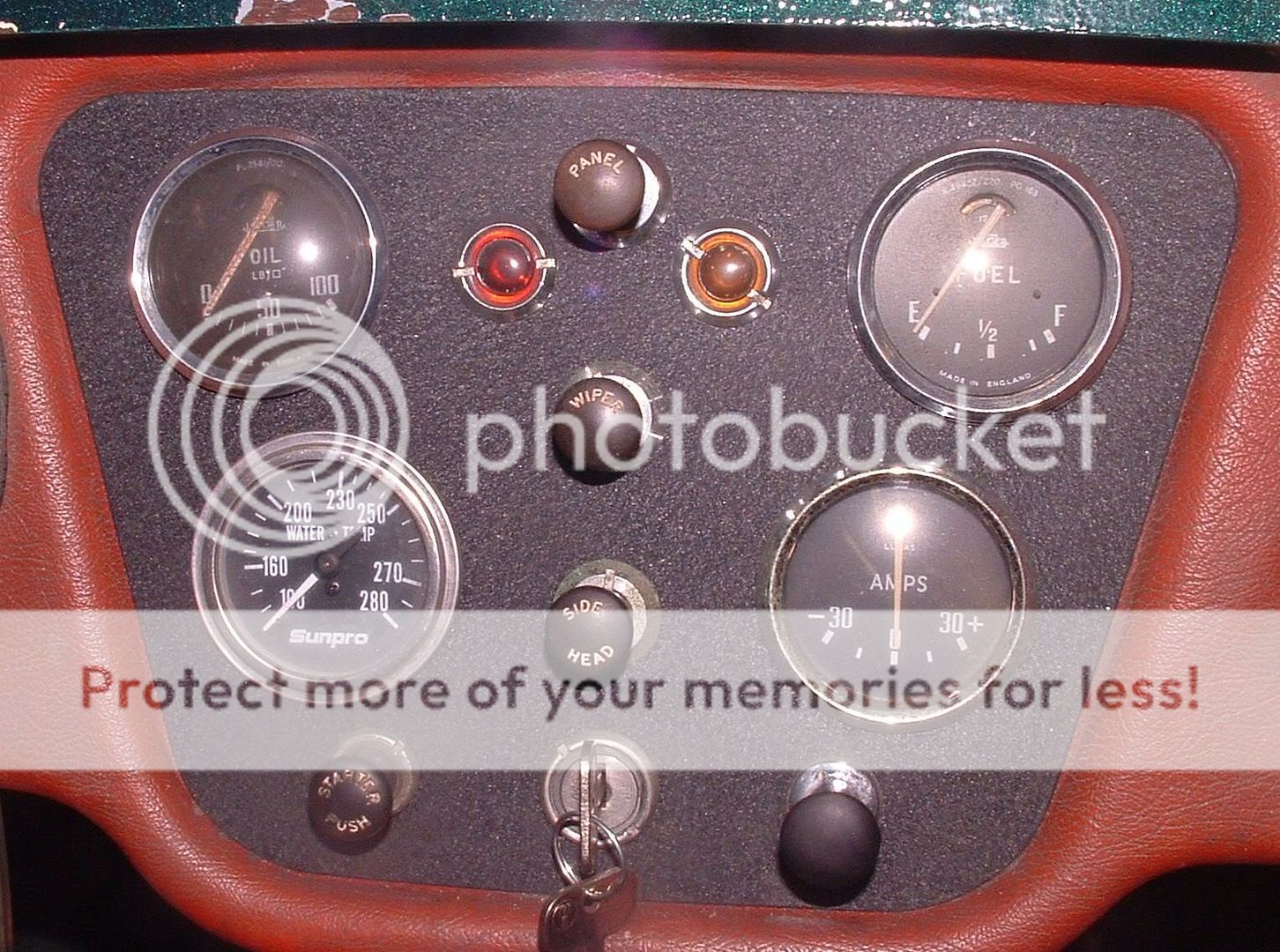
Oil gauge top left, fuel top right. Temp lower left, amps lower right.
Top switch is for panel lamps, below that is wiper, then headlights. Ignition switch bottom center, starter push to the left, choke to the right.
This is correct (ignoring my aftermarket temp gauge, choke knob & crinkle finish)
TR3driver
Great Pumpkin - R.I.P
Offline
Not certain, but I think the white paint was originally fluorescent, to make it more visible under the marginal lighting. At any rate, when I reach that point, I intend to try some of this:
https://www.hipoparts.com/products/Fluorescent-Speedo-%26-Gauge-Needle-Restoration-Paint.html
(in white of course)
https://www.hipoparts.com/products/Fluorescent-Speedo-%26-Gauge-Needle-Restoration-Paint.html
(in white of course)
As Randall showed, the important gages, oil and temp were closest to the driver whether here or in England.
At TS 29098 the speedometer went over to the right side on left hand drive cars, so passengers could read mileage readings for rallys. Was not swapped in England though, no need. (or so the "Book" says) The switches were never changed on either side of the pond, choke always on the right with the carbs of course.
At TS 29098 the speedometer went over to the right side on left hand drive cars, so passengers could read mileage readings for rallys. Was not swapped in England though, no need. (or so the "Book" says) The switches were never changed on either side of the pond, choke always on the right with the carbs of course.

6TTR3A
Jedi Warrior
Offline
<span style="font-size: 12pt">Randall's photo covers the gauges correctly, but there is a conflict on the switches, panel & wiper.
TRA Concours judging standards states TR3 wiper switch on top, panel light switch below, which is contrary to any TR3 (early or late) that I've ever seen.
However, when the Rheostat panel switch was introduced
(somewhere around 60K)the panel light switch was definitely
below.
The facia was modified to accommodate the larger neck
on the rheostat switch in the lower position.
Piggot's latest sidescreen book says the the panel light was on top thru the 3B series, which I disagree with.
Re paint: I mask it off & use flat white quick dry spray.
Frank </span>
TRA Concours judging standards states TR3 wiper switch on top, panel light switch below, which is contrary to any TR3 (early or late) that I've ever seen.
However, when the Rheostat panel switch was introduced
(somewhere around 60K)the panel light switch was definitely
below.
The facia was modified to accommodate the larger neck
on the rheostat switch in the lower position.
Piggot's latest sidescreen book says the the panel light was on top thru the 3B series, which I disagree with.
Re paint: I mask it off & use flat white quick dry spray.
Frank </span>
TR3driver
Great Pumpkin - R.I.P
Offline
Interesting, another error in the TRA guidelines and in Bill's book(s). I am quite positive that cars with the switch for the dash lights, had that switch on top; and that cars with the rheostat had it in the second position.
The problem was that the rheostat would not fit in the top location. Nor would the early switch for the optional 2-speed wipers. Note how the lamps for turn and ignition are closer to the top switch location. They extend farther out on the back of the panel, so the relatively slim SPST switch used for both panel lamps (on earlier cars), and single-speed wipers, is the only thing that fits in that location.
The problem was that the rheostat would not fit in the top location. Nor would the early switch for the optional 2-speed wipers. Note how the lamps for turn and ignition are closer to the top switch location. They extend farther out on the back of the panel, so the relatively slim SPST switch used for both panel lamps (on earlier cars), and single-speed wipers, is the only thing that fits in that location.

Geo Hahn
Yoda
Offline
JohnBazzano said:As Randall showed, the important gages, oil and temp were closest to the driver whether here or in England....
Oddly, the wiring diagram in the 'Practical Hints' shows a RHD layout with the panel rheostat in the middle but... the H2O temp gauge at top left and fuel guage at bottom right.
TR3driver
Great Pumpkin - R.I.P
Offline
Actually, it depends on which version of Practical Hints you look at. The 4th edition shows the dash light switch in top position, in both the wiring diagram and Figure 1:
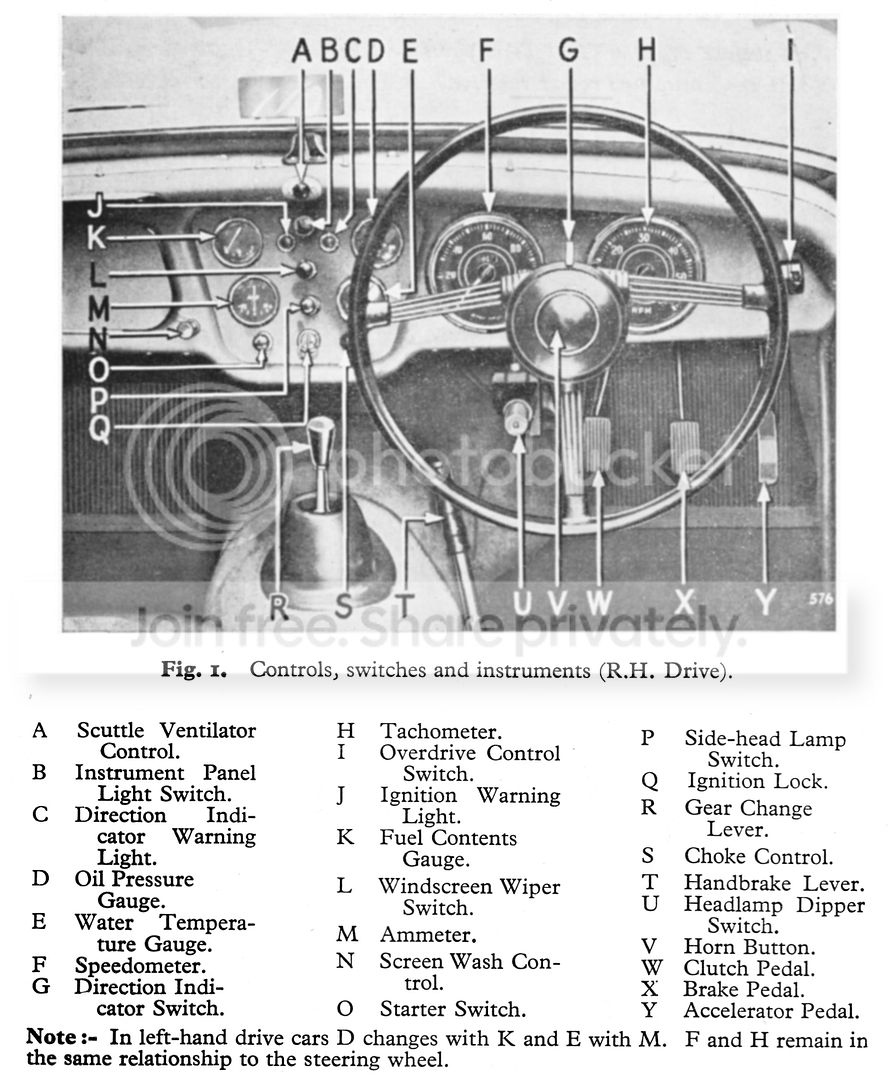
https://i258.photobucket.com/albums/hh260/TR3driver/Manual%20pages/Fig1Controls.jpg
https://i258.photobucket.com/albums/hh260/TR3driver/Manual%20pages/Fig1Controls.jpg