

-
 Hey Guest!
British Car Forum has been supporting enthusiasts for over 25 years by providing a great place to share our love for British cars. You can support our efforts by upgrading your membership for less than the dues of most car clubs. There are some perks with a member upgrade!**Upgrade Now**
(PS: Upgraded members don't see this banner, nor will you see the Google ads that appear on the site.)
You are using an out of date browser. It may not display this or other websites correctly.
You should upgrade or use an alternative browser.
You should upgrade or use an alternative browser.
Posting a Video
- Thread starter PAUL161
- Start date


Online
Paul. use this icon (just to right of photo icon)

Also, remove the "s" from the "https"
Also, remove the "s" from the "https"


Offline
Hi Paul - I doubt you can post an MP4 to BCF. But if the MP4 is on another website page, you could just post the link to that website page.
Sounds like you're not trying to post a YouTube video link, which is easy to do. If you tell us the url (web page address) of the page that has the MP4, we might be able to talk you through it.
Tom M.
Sounds like you're not trying to post a YouTube video link, which is easy to do. If you tell us the url (web page address) of the page that has the MP4, we might be able to talk you through it.
Tom M.

Offline
Tom it's a video a friend in California sent me, it's not important but would like to know how he sent it. I'll email him and ask.
Next best, in this case, is to upload it to YouTube and then post a link to it.

Offline
You can't upload a video here like you can with pictures. However, you can copy the address of a YouTube video and use the "Insert Video" icon in the editor to "post" a YouTube video:
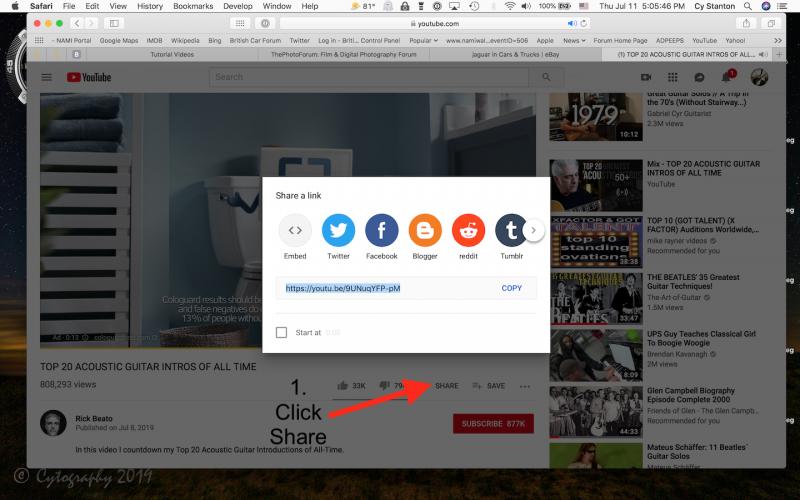
1. From a YouTube video, click the "Share" icon on the lower right of the video, then copy the URL address of the video.
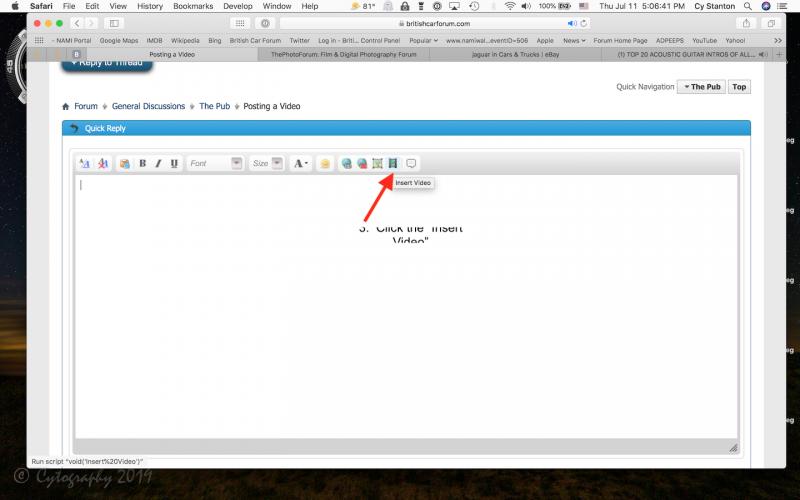
2. Click the "Insert Video" icon on the editor (looks like a piece of film):
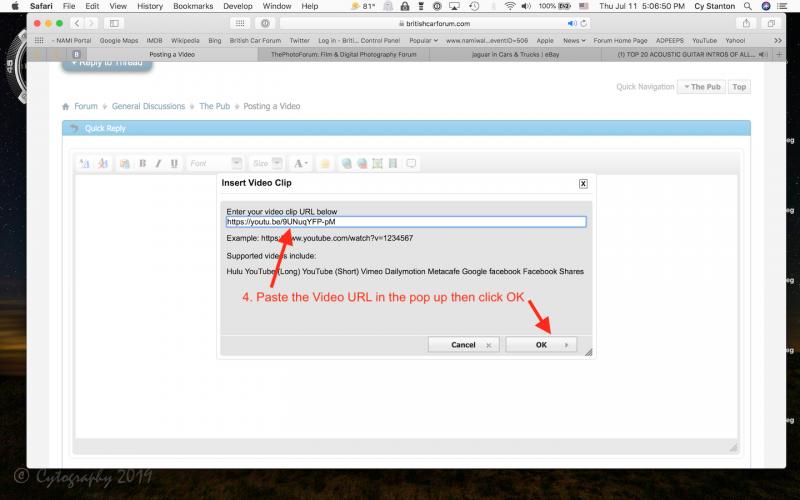
3. When you get the Pop up window, paste the Video URL into the field provided and click OK
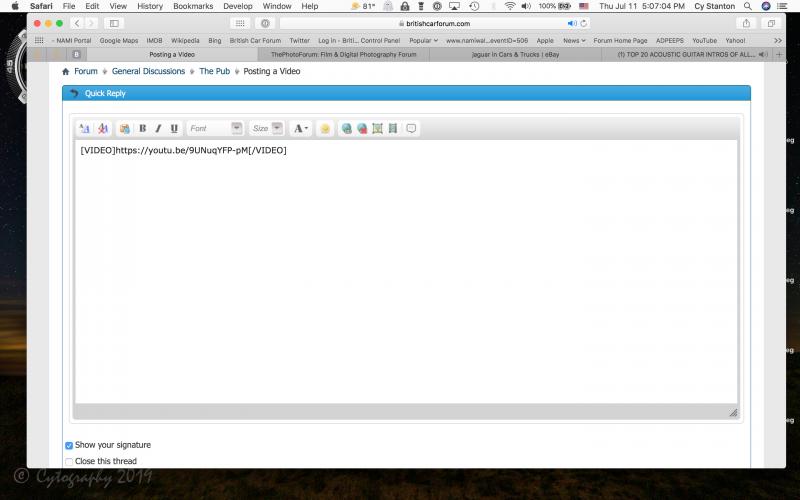
Then once the video "code" is pasted into the editor, type whatever text you want (above and/or below the code), then just post your message like normal and the video should be displayed in the post.
NOTE: You used to have to remove the "s" in "https" part of the address but now that I've made the BCF completely https compliant, you no longer need to do that - just paste the video URL exactly as it is copied from YouTube.
1. From a YouTube video, click the "Share" icon on the lower right of the video, then copy the URL address of the video.
2. Click the "Insert Video" icon on the editor (looks like a piece of film):
3. When you get the Pop up window, paste the Video URL into the field provided and click OK
Then once the video "code" is pasted into the editor, type whatever text you want (above and/or below the code), then just post your message like normal and the video should be displayed in the post.
NOTE: You used to have to remove the "s" in "https" part of the address but now that I've made the BCF completely https compliant, you no longer need to do that - just paste the video URL exactly as it is copied from YouTube.