• Hey Guest!
    British Car Forum has been supporting enthusiasts for over 25 years by providing a great place to share our love for British cars. You can support our efforts by upgrading your membership for less than the dues of most car clubs. There are some perks with a member upgrade!

    **Upgrade Now**
    (PS: Upgraded members don't see this banner, nor will you see the Google ads that appear on the site.)
Tips
Tips

Now how do I make it stop?

doates

Senior Member
Offline
Hi everyone,

In trying to sort out my charging/stalling problem I decided to fix all of the electrical problems that I created from poor reassembly (turn signals, flashers, head lights, dash board lights, basically anything electrical). I would like to blame Lucas but I am sure that I played a large roll in the problems.

Anyway, the spit has been the warmest convertible that I have ever had even though the fan did not blow. While I had the dash out I decided to try to fix the fan. I think all that was wrong with it was the 40 years of crud and paint (mine) that was layered on the rheostat thing under the dash. Cleaned those two copper bars on the control panel and the motor fired right up. Problem is I can't get it to stop and there is no speed control; I assume that is what the rheostat is for? The fan control has a finger on the back side that rubs against a copper bar; there are actually two bars but my finger only touches one of them. Is it supposed to rub on both? Was there something that caused the finger to lift and break the circuit that may have disappeared?

So far, I have not found a new controller so I am looking for ideas on how to make it shut off; besides pulling a wire.

Thanks in Advance
 
Yes, the rheostat is supposed to provide speed control. Generally there should be some sort of coil of resistance wire that runs between those two bars; although it may be buried in ceramic so it looks like just a bunch of stripes of metal. The finger will move along the coil to provide a variable resistance. One of the bars will be high speed (no resistance), the other will be minimum speed (maximum resistance). Frequently the finger is allowed to move beyond one of the bars, to break the connection entirely and turn the motor off.

Curiously, though, the wiring diagram I have for a Mk 3 Spit shows a simple on/off switch rather than a rheostat. You might want to try pulling a wire from your rheostat, to be sure it's the heater control.
 
It would be curious if someone had a problem in the past and directly wired the heater fan to be on at all times, but then what is the rheostat for? This is interesting.
 
Hi Again,

I found this one used at Rimmer. It looks just like mine except that on mine the tip of the finger only rubs the inner copper bar. On this the finger rubs the outer. The 2nd wire attaches to the inner copper bar. If I disconnect that wire the fan stops but if I disconnect the green/yellow wire it doesn't. I should have checked for resistance between the two bars.

[image]https://i23.photobucket.com/albums/b377/dennis_oates/622236U.jpg

Thanks
 
TR3driver said:
Curiously, though, the wiring diagram I have for a Mk 3 Spit shows a simple on/off switch rather than a rheostat. You might want to try pulling a wire from your rheostat, to be sure it's the heater control.

The 1967-1968 Spitfire Mk 3's had the original center-mounted gauges and switches and did have a simple switch for the heater fan (Can't recall if it was 1 or 2-speed switch though).

The 1969-1970 Spitfire Mk 3's had the dash redesigned where the gauges are in front of the driver so the switch probably changed at this time.

Scott
 
Actually the wiring diagram that most nearly matches my car is for '71 MK IV. Though it is not perfect.
 
doates said:
I found this one used at Rimmer. It looks just like mine except that on mine the tip of the finger only rubs the inner copper bar. On this the finger rubs the outer. The 2nd wire attaches to the inner copper bar. If I disconnect that wire the fan stops but if I disconnect the green/yellow wire it doesn't. I should have checked for resistance between the two bars.

[image]https://i23.photobucket.com/albums/b377/dennis_oates/622236U.jpg
I'm going to go out on a limb here, and say that I don't think that is a rheostat at all. I think there should be a Bowden cable attached between that clip on the left (with the bolt head visible under the green/yellow wire) and the clevis visible to the right of the clip. And as the lever at the top of the photo moves from side to side, it moves the cable (which is likely attached at the other end to an air door somewhere) without changing the resistance to the heater motor.

Then presumably at some point in the motion (likely the full cold end), it interrupts power to the motor entirely. I don't see quite how that happens, but it's the only thing that makes sense to me. Those copper bars won't have enough resistance to affect the motor at all. The finger and bar are only so the on/off switch can be incorporated with the water control.

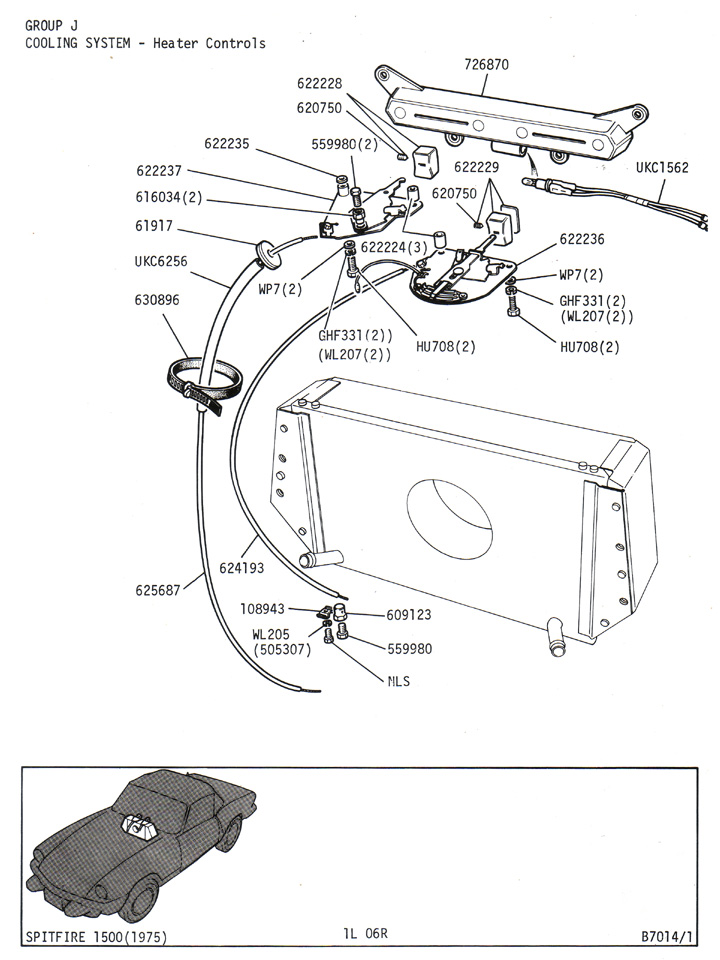
Here's a manual page on the Canley Classics site that shows the control and the Bowden cable

spitfire1500_plate_1l_06r.jpg
 
That is exactly how mine operates. Cable controls an air door that diverts air from the cabin to the screen. When the lever is moved all the way to the driver's right it is in the off position. I am wondering if there was a ramp or something to break the contact with the copper bars? I may try coating the end of the bar with epoxy and see if that works. I wonder why they call it a rheostat and why two wires to it?

I would order the one from Rimmer; it is cheap but shipping is 4X the cost of the part.

I am sure that this has been asked many times but how do you get a picture to post in the body of your message?

Thanks Again

Dennis
 
doates said:
I am sure that this has been asked many times but how do you get a picture to post in the body of your message?
There are various ways. One of the reasons I like PhotoBucket is because it automagically provides the appropriate tags. You just click in the "IMG Code" box
untitled.jpg

and both the tags and URL are copied to the clipboard, so you can switch to the BCF post and paste them.
<div class="ubbcode-block"><div class="ubbcode-header">Code:</div><div class="ubbcode-body ubbcode-pre" ><pre>
DSCF0008dimmed.jpg
</pre>[/QUOTE]
If the photo is on another site, then I usually just type the tags by hand:
<div class="ubbcode-block"><div class="ubbcode-header">Code:</div><div class="ubbcode-body ubbcode-pre" ><pre>
</pre>[/QUOTE]
and paste the link in the middle:
<div class="ubbcode-block"><div class="ubbcode-header">Code:</div><div class="ubbcode-body ubbcode-pre" ><pre>
622236U.jpg
</pre>[/QUOTE]

But if you prefer a "point and click" method, then click on either the "<span style="text-decoration: underline">Reply</span>" or "<span style="text-decoration: underline">Switch to Full Reply Screen</span>" links. The "Full Reply" screen has a toolbar:
toolbar.jpg

where you can click on the "Enter an image" icon
image3.jpg

and then paste (or type) the URL into the dialog.

With all of these methods, all you will see at first are the tags and URL. But you can then click on the "Preview Post" button, and see what your post will look like to others.
 
I hate to suggest the obvious, but I've not seen it mentioned here. Are you pushing and pulling the knob (in and out) or just sliding it left and right? It is a two-speed fan: pulling the knob all the way out gives you the higher fan speed, and pushing it all the way in shuts it off.
 
As always Andy beats me to the answer. I was going to say that my GT6 has kind of the same switch and it was stuck in the on or off position and with some elbow grease I was able to get it unstuck so it would go in and out as well as right to left.
 
Yep, the obvious wins. The lever pulls in and out for stop and two speeds and moves left and right to divert air flow. Boy do I feel dumb.

Unfortunately, the fan is so loud I will probably never use it. Bearing squeak and the squirrel cage is cracked and out of round. Fortunately, I live in California where I don't really need heat.


Thanks Again....Dennis
 
Back
Top