• Hey Guest!
    British Car Forum has been supporting enthusiasts for over 25 years by providing a great place to share our love for British cars. You can support our efforts by upgrading your membership for less than the dues of most car clubs. There are some perks with a member upgrade!

    **Upgrade Now**
    (PS: Upgraded members don't see this banner, nor will you see the Google ads that appear on the site.)
Tips
Tips

New laptop can not open BMIHT CD's

angelfj1

Yoda
Country flag
Offline
just got a new laptop running ms vista

can not load BMIHT CD help!!!

see error messages below

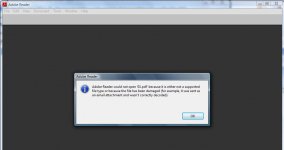
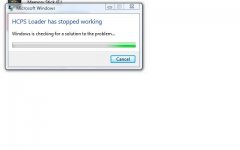
1st error message when trying to use cd normally e.g. auto run

2nd error message when trying to open pdf directly I realize that these files are copy protected but the cd is in the drive for gosh sakes. :wall:
 

Attachments

  • 17697.jpg
    17697.jpg
    17 KB · Views: 273
  • 17698.jpg
    17698.jpg
    39 KB · Views: 271
I think this showed up on the TR Register forum a while ago - here' what it says on the Heritage website:

"These CD's do not currently work on the Vista platform - we are waiting for details about an upgrade. Please note that these CD's are NOT Mac compatible."

Another good excuse to use the old XP computer in the garage!

Randy
 
I'll have to try my copy on Vista. But ISTR that you are required to use the enclosed program to use the CD. Even though it is in pdf format, it required their application. I think.

edit: Same problem here on Vista. Now I'll have to try to work on it. Sorry.
 
Unless things have changed, Vista IS your problem. My copies of Heritage manuals on CD will only run on older OSs like XP and '98. When I last checked the Heritage web site there was a message that said they knew of the problem and were working on a solution. That was 6+ months ago.

My answer was to buy a used laptop that runs XP. OK... I wanted a laptop for other purposes too. However, I bought an older machine that runs XP so I wouldn't have to face loosing several programs that were NOT going to run under Vista.

EDIT:
Regarding direct opening of the PDFs... that's not possible either. However, if you have an older machine (non Vista) you CAN copy and open the PDF documents one at a time. Vista and Heritage CDs REALLY don't get along at all.
 
"Driving the Remains of a Faltering Economy": MICROSOFT!

:devilgrin:

Just send me th' CD, Frank. I'll open it under Linux, then you can call me for "support". :jester:

Seriously: This is my argument for OpenSource. If you've PAID for information, WHY should you have to pay AGAIN to access it?
 
I have Vista ultimate on my laptop and the cd I have opens fine.
 
Lots of folk I know have been pitching Vista and installing XP in it's place. I believe MS has agreed that no additional license is required to do this. But before you start, make sure you have the XP drivers for your hardware on hand. In some cases there may not be XP drivers available.
 
DrEntropy said:
This is my argument for OpenSource. If you've PAID for information, WHY should you have to pay AGAIN to access it?

HERE HERE!!! Running Linux Mint 5 right now! If apple releases iTunes for the Ubuntu base, I will NEVER NEVER EVER use anything Microsoft again! (except maybe at work where I'm forced to)

HAIL TO TH' PENGUIN!!!
 
Don_R said:
I have Vista ultimate on my laptop and the cd I have opens fine.

And you are using a Heritage CD (not one of the generic manuals on a CD)??? If so, you are the only person I have heard of in the past 18 months who can run Heritage CDs. Of course, everyone else I know (like me) is running Vista Home Premium, not Ultimate.
 
We have 2 Vista PCs and I really like it adn has been completely trouble free (now I've done it!)

But I also have my old Thinkpad in the shop, it's slower but now I'm glad I kept it. It came with Win2K but I loaded XP when the HDD died a couple of years ago. It's also my only PC with a true serial port, something needed for my ODB-II computer interface for my other vehicles.
 
Those who have the Heritage CDs will be interested to know that the Heritage web site still has the following message:

<span style="color: #FF0000"><span style="font-style: italic">System requirements: Windows 98 minimum, Pentium III, 64 Mb RAM, Adobe Acrobat Reader v6.0.

These CD's do not currently work on the Vista platform - an upgrade will be available shortly.</span></span>

https://www.heritage-motor-centre.co.uk/shop/technical-publications/index.html

That's the message I mentioned earlier that has been on posted for at least 6 months.
 
Doug,

I have the official Heritage Motor Centre Cd for the Spitfire.

The only thing I can't do is download the wallpapers that are on the disk.

I have had no problem opening the Parts & workshop pubs or the owner's lit.


Maybe it is because I have Vista Ultimate. I bought the cd not realizing that it was not Vista compliant and just stuffed it in my vista machine and it worked. I have an old XP desktop but didn't need to use it.


Dumb luck finally worked in my favor..YEA!!!
 
Don, you are to be congratulated.

I have Heritage CDs for the Spitfire and my Mini. Neither will run on our Vista desktop machine. Perhaps Ultimate is the answer. However, I would have thought Heritage would have a message to that effect on their web site.

I tried just about every trick people suggested short of dual-boot operating systems and/or a WinXP emulator.
 
Back
Top