• Hey Guest!
    British Car Forum has been supporting enthusiasts for over 25 years by providing a great place to share our love for British cars. You can support our efforts by upgrading your membership for less than the dues of most car clubs. There are some perks with a member upgrade!

    **Upgrade Now**
    (PS: Upgraded members don't see this banner, nor will you see the Google ads that appear on the site.)
Tips
Tips

My neat garage

pdplot

Yoda
Country flag
Offline
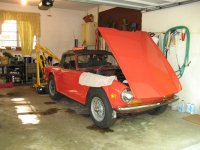
Here is my garage as it exists today. Note TR6 with hood up...

I can't upload the file. When I type in the filename to attach - garage1.JPG - it tells me "no file found". Frustrating as all get out. The picture is saved in Windows photo gallery. I'll try one more time - then I need help. These %$#@# computers...
 
I've never had to type in a file name to upload a picture. Click the "insert image" icon (right side of the line of icons above the text window in a post; looks like a small picture of a tree). That opens an "insert image" window. Click on the tab "from computer", then click "select files" at the bottom. You'll then see a directory of a folder on your computer, the click the name of the picture you want to use. If the picture isn't there, you need to move to the correct directory.

Hang in there.
Tom
 
I'll try again. It doesn't say select files. Says choose file. When I type in name of file, it tells me file not found. My nephew tried to help me yesterday but he has a Mac and knows nothing about PCs. My computer savvy daughter was baffled and couldn't help either. I once flew airplanes but I'm challenged by these stupid computers...
 
image.jpgThis was easy. Just clicked choose file from existing. I am using my I Pad though. I don't remember having problems with my PC. Probably something simple. Aren't there tutorials on this site somewhere?
 
OK I am on my wifes PC and cant make it work. I selected a file from the computer and clicked upload file and nothing happened.
 
Easiest and best way is to create a photobucket account and simply post the link. Literally takes seconds to do.

7FB9F448-2233-411F-AE7B-8DE182A628F7-33126-00002F7BF0A80BB9.jpg
 
Back
Top