

-
 Hey Guest!
British Car Forum has been supporting enthusiasts for over 25 years by providing a great place to share our love for British cars. You can support our efforts by upgrading your membership for less than the dues of most car clubs. There are some perks with a member upgrade!**Upgrade Now**
(PS: Upgraded members don't see this banner, nor will you see the Google ads that appear on the site.)

Tips
- We have a special forum called "Member Articles" where you can submit actual articles for consideration for publication. Learn More
- Don't have an Avatar? If not, your avatar will default to the 1st character in your username. Go into "Account Details" to change your Avatar.
- Some basic forum navigation info: click
 Hey - did you know if you click on the title of a thread it will take you to the first unread post since you last visited that thread?
- Hey Guest - Is your British Car Club in our Clubs database? If not, send me a PM - Basil

- Looking for a local club? Click the "Clubs" tab above and browse hundreds of clubs world-wide.
- Add Android or iPhone APP: click
- Did you know - any picture or video you add in your posts in any marque-specific forum will also get added to the Media Gallery automatically.
- A few more tips about posting and replying: click
- Hey there Guest - be sure to keep your profile page up to date with interesting info about yourself: learn more
- More tips and tricks on Posting and Replying: click
 but were afraid to ask:
  STOP!! Never post your email address in open forums. Bots can "harvest" your email! If you must share your email use a Private Message or use the
  smilie in place of the real @
- Want to mention another member in a post & get their attention? WATCH THIS

- So, you created a "Group" here at BCF and would like to invite other members to join? Watch this!
- Hey Guest - A post a day keeps Basil from visiting you in the small hours and putting a bat up your nightdress!
- Hey Guest - do you know of an upcoming British car event?
 Pretty Please - add it to our Events forum(s) and add to the calendar! >> Here's How <<
- Hey Guest - you be stylin' Change the look and feel of the forum to fit your taste. Check it out
- If you run across an inappropriate post, for example a post that breaks our rules or looks like it might be spam, you can report the post to the moderators: Learn More
- If you would like to try some different "looks" or styles for the site, scroll to the very bottom, on the left and click the Style Selector.
You are using an out of date browser. It may not display this or other websites correctly.
You should upgrade or use an alternative browser.
You should upgrade or use an alternative browser.
Computer "Copy". Where does it go?
- Thread starter PAUL161
- Start date


BIBBER
Jedi Knight
Offline
Re: Computer "Copy". Where does it go?
Paul..it is just stored in a temporary file on the system called NotePad. You need to take the image after you highlight and copy then paste it into a permanent file either back into the file that is currently open you copied from or open a new file such as MS Word, Paint etc.to paste it in. Hope that helps.
Yea...what DOC said
|
|
|
V
Paul..it is just stored in a temporary file on the system called NotePad. You need to take the image after you highlight and copy then paste it into a permanent file either back into the file that is currently open you copied from or open a new file such as MS Word, Paint etc.to paste it in. Hope that helps.
Yea...what DOC said
|
|
|
V

bugimike
Yoda
Offline
Re: Computer "Copy". Where does it go?
Unless you paste it somewhere else and save it it gets re-written-over the next time you "copy" something. I.e. if you pick something up, you must put it down someplace before you pick up something else, or you will drop it! Does that make any sense?
Unless you paste it somewhere else and save it it gets re-written-over the next time you "copy" something. I.e. if you pick something up, you must put it down someplace before you pick up something else, or you will drop it! Does that make any sense?

ecurie_ecosse
Luke Skywalker
Offline
Re: Computer "Copy". Where does it go?
No,but it sure sounds like fun! /bcforum/images/%%GRAEMLIN_URL%%/jester.gif /bcforum/images/%%GRAEMLIN_URL%%/devilgrin.gif
Of course,you need to remember where you put it.Or you'll have a "senior" moment and panic. /bcforum/images/%%GRAEMLIN_URL%%/devilgrin.gif /bcforum/images/%%GRAEMLIN_URL%%/jester.gif
Stuart. /bcforum/images/%%GRAEMLIN_URL%%/cheers.gif
bugimike said:Unless you paste it somewhere else and save it it gets re-written-over the next time you "copy" something. I.e. if you pick something up, you must put it down someplace before you pick up something else, or you will drop it! Does that make any sense?
No,but it sure sounds like fun! /bcforum/images/%%GRAEMLIN_URL%%/jester.gif /bcforum/images/%%GRAEMLIN_URL%%/devilgrin.gif
Of course,you need to remember where you put it.Or you'll have a "senior" moment and panic. /bcforum/images/%%GRAEMLIN_URL%%/devilgrin.gif /bcforum/images/%%GRAEMLIN_URL%%/jester.gif
Stuart. /bcforum/images/%%GRAEMLIN_URL%%/cheers.gif


Steve_S
Yoda
Offline
Re: Computer "Copy". Where does it go?
Using "copy" is like reading a line in a book and committing it to memory. Paste is like writing it back down on a piece of paper somewhere else.
In this case you're telling the computer to remember something that you want to enter in another file somewhere. It will only remember one thing at a time using this method, so each time you copy, you need to paste it somewhere.
Using "copy" is like reading a line in a book and committing it to memory. Paste is like writing it back down on a piece of paper somewhere else.
In this case you're telling the computer to remember something that you want to enter in another file somewhere. It will only remember one thing at a time using this method, so each time you copy, you need to paste it somewhere.

Don_Neff
Jedi Hopeful
Offline
Re: Computer "Copy". Where does it go?
1) Highlight some text and press Control-C to copy it.
2) Open your word processor program and click on the blank page.
3) Then press Control-V to paste the text from memory.
4) Now save what you copied as file on your drive for later use.
1) Highlight some text and press Control-C to copy it.
2) Open your word processor program and click on the blank page.
3) Then press Control-V to paste the text from memory.
4) Now save what you copied as file on your drive for later use.

GregW
Yoda

Online
Re: Computer "Copy". Where does it go?
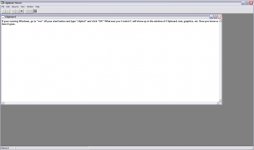
If your running Windows, go to “run” off your start button and type “clipbrd” and click “OK” What ever you Control-C will show up in the window of Clipboard, text, graphics, etc. Now you know where it goes. /bcforum/images/%%GRAEMLIN_URL%%/computer.gif
If your running Windows, go to “run” off your start button and type “clipbrd” and click “OK” What ever you Control-C will show up in the window of Clipboard, text, graphics, etc. Now you know where it goes. /bcforum/images/%%GRAEMLIN_URL%%/computer.gif

Offline
Re: Computer "Copy". Where does it go?
So I start, run and opened up clipboard. I copy & paste your entry and go to print screen to give a graphic representation of what you said and then.... what wait.. what happened to my paste. Hmm try again... what... wait... try it you can't do it. /bcforum/images/%%GRAEMLIN_URL%%/smile.gif
So I start, run and opened up clipboard. I copy & paste your entry and go to print screen to give a graphic representation of what you said and then.... what wait.. what happened to my paste. Hmm try again... what... wait... try it you can't do it. /bcforum/images/%%GRAEMLIN_URL%%/smile.gif
OP

Offline
Re: Computer "Copy". Where does it go?
Thanks Steve and thanks to all. Explained very well.

I forgot to mention that while getting more educated on Vista, I just found a program called "The Snipping Tool". It works great for saving small or large portions of a document or a portion or all of a photo in a document. It's in accessories in the main menu.
Steve_S said:Using "copy" is like reading a line in a book and committing it to memory. Paste is like writing it back down on a piece of paper somewhere else.
In this case you're telling the computer to remember something that you want to enter in another file somewhere. It will only remember one thing at a time using this method, so each time you copy, you need to paste it somewhere.
Thanks Steve and thanks to all. Explained very well.
I forgot to mention that while getting more educated on Vista, I just found a program called "The Snipping Tool". It works great for saving small or large portions of a document or a portion or all of a photo in a document. It's in accessories in the main menu.